Page 14 of 17
Posted: Sat Oct 03, 2015 11:18 pm
by 3FG
Thanks, tranx. I changed the filenames and references to the map and image files so that the 422-1 and 422-2 have separate files. Now we have RDF files for Inteset 422, 422-1, and 422-2. Also map and image files 422.x and 422-2.x. The 422-1 uses the same map/images files as the original 422.
With all of these files in the rdf and image folders, when one downloads from a remote with 32653265 signature, RMIR should ask the user whether the remote is a 422-1 or 422-2. I can't test that aspect since I don't own any of these remotes.
All of these files have been checked in to SourceForge and are available in the
RDF\Development folder.
Posted: Sun Oct 04, 2015 12:48 am
by tranx
3FG wrote:...With all of these files in the rdf and image folders, when one downloads from a remote with 32653265 signature, RMIR should ask the user whether the remote is a 422-1 or 422-2. I can't test that aspect since I don't own any of these remotes...
That's great, and confirm that the user does get asked to choose between 422-1 and 422-2.
Just trying it out and could simply start again from scratch but if anyone has done a lot for different versions with the older set of files, would the following suffice?
(In files opened with notepad etc.)
for .rmir
[General]
Remote.name=Inteset INT-422-2
<--- edit
Remote.signature=35653565
Notes=
.....
.....
for .rmir and .rmdu
.....
.....
[DeviceUpgrade]
Description=TV -Samsung UE55F8000ST
Remote.name=Inteset INT-422-2
<--- edit
Remote.signature=35653565
.....
.....
Posted: Sun Oct 04, 2015 6:25 am
by tranx
deleted
Posted: Tue Oct 06, 2015 10:10 pm
by unclemiltie
Does anyone have an Inteset 422 (3494 signature) that they'd like to donate to the cause of extender development? I'm finishing up the extender for the Inteset 422-1 (3565) and would really like to validate the code that I wrote for the 3494 remote before I release it.
PM me if you're interested in donating!
Thanks guys!
Posted: Fri Oct 23, 2015 12:12 pm
by iboston
3FG wrote:Thanks, tranx. I changed the filenames and references to the map and image files so that the 422-1 and 422-2 have separate files. Now we have RDF files for Inteset 422, 422-1, and 422-2. Also map and image files 422.x and 422-2.x. The 422-1 uses the same map/images files as the original 422.
With all of these files in the rdf and image folders, when one downloads from a remote with 32653265 signature, RMIR should ask the user whether the remote is a 422-1 or 422-2. I can't test that aspect since I don't own any of these remotes.
All of these files have been checked in to SourceForge and are available in the
RDF\Development folder.
I just received the 422-2 Signature 3565 remote in the mail, and its working GREAT.
Much Appreciated!
Posted: Sat Dec 26, 2015 7:02 am
by tranx
Playing with Insignia 67100 again using a pause device from MrMoody
https://www.hifi-remote.com/forums/viewt ... highlight=
- with that pause device, even without the extender (in which the pause function had been problematic for us), it turns out that we can have everything we currently need...
https://www.hifi-remote.com/forums/dload ... e_id=13801
- and having a few more buttons with 67100 compared to 6440/OARUSB04G and Extenders, seems to be a workable alternative.
Our 67100s may be later versions with knobs under the front end to stop the remote rolling around, no backlighting, and slightly different labelling, including 'NS-RC05A-II' below the word 'INSIGNIA'.
A few things in the existing 31473147 (Insignia Remote 67100).rdf, in the Map, and in the Image were edited, better to suit the version we have, and so far that modified set of files works ok.
Zipped:
https://www.hifi-remote.com/forums/dload ... e_id=13800
Changes to the labels of the lowest 8 buttons
Fav = Fav, SAP=
Audio, P-Lock/Game=
P-Lock, CCD=
CC,
Sleep=Sleep, Audio/DynVol=
Audyssey, Pict=Pict Zoom=Zoom
Phantoms Renamed in RDF
Phantoms previously 'Discrete On' and 'Discrete OFF' were edited to 'Phantom.n'
and the first five Phantoms were shuffled to be in numerical order.
- but would appreciate any help if it is feasible to make a couple more changes as follows
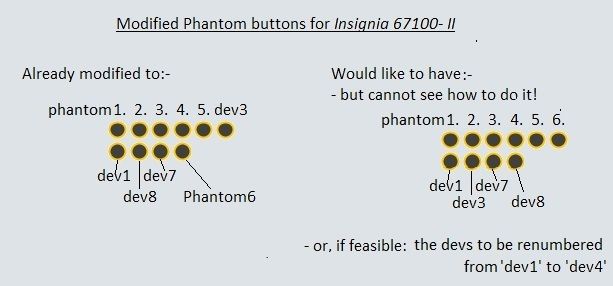
Posted: Sun Dec 27, 2015 11:09 am
by MrMoody
I don't deserve any credit for the pause protocol other than telling you about it.
I have 2 of the exact same model remote. It's actually NS-RC05A-11 (eleven) not II. I got them off ebay IIRC.
I had already made an improved JPG/MAP/RDF for it. I just uploaded them
here.
I guess you could rearrange the phantom buttons by defining them in the .map file instead of letting RemoteMaster create them on the fly.
Posted: Sun Dec 27, 2015 3:49 pm
by tranx
MrMoody wrote:I don't deserve any credit for the pause protocol other than telling you about it.
I have 2 of the exact same model remote. It's actually NS-RC05A-11 (eleven) not II. I got them off ebay IIRC.
I had already made an improved JPG/MAP/RDF for it. I just uploaded them
here.
I guess you could rearrange the phantom buttons by defining them in the .map file instead of letting RemoteMaster create them on the fly.
That's a nice Illustration, and it must have taken some time to do the MAP and RDF to suit, and right, I see it should be NS-RC05A-11, not II

In the RDF to go with the improved JPG/MAP, what purpose does "pip on/off:" serve? (marked in bold in the section below) or is it just a comment which has no effect?
1=$26,2=$27,3=$28,4=$29,5=$2A,6=$2B,7=$2C,8=$2D,9=$2E,0=$2F
Input=$30
"+100":Dash=$31
"vol up":Vol+=$12,"vol down":Vol-=$13,Mute=$18
"channel up":Ch+=$14,"channel down":Ch-=$15,"prev ch":Recall=$19
"fav/scan":Fav=$25
Audio=$22
P-Lock=$3F
CC=$23
Sleep=$35
DynVol/Audyssey=$34
"pip on/off":Pict=$37
Zoom=$32
phantom1=$02
phantom2=$33
phantom3=$36
phantom4=$3D
DiscreteON=$3E
DiscreteOFF=$40
I guess you could rearrange the phantom buttons by defining them in the .map file instead of letting RemoteMaster create them on the fly.
If remote master creates the labels for phantoms dev1, dev3, dev7, and dev8 on the fly, I suppose that's why I couldn't see what to change in the text - but would you give an example of how instead they could be defined in the map file, and show how the position of dev3 (at the end of the first row of the display of phantoms in RMIR's layout tab) could be exchanged for that of phantom6 (at the end of the second row)?
Posted: Sun Dec 27, 2015 5:15 pm
by MrMoody
tranx wrote:
In the RDF to go with the improved JPG/MAP, what purpose does "pip on/off:" serve? (marked in bold in the section below)
"pip on/off":Pict=$37
It's essentially an alternate or standardized name for the Pict button. It doesn't show up anywhere in RM, it's only used when loading an upgrade from another remote to match up the buttons automatically.
If you don't have it already, have a look at the
RDF specification.
If remote master creates the labels for phantoms dev1, dev3, dev7, and dev8 on the fly, I suppose that's why I couldn't see what to change in the text - but would you give an example of how instead they could be defined in the map file, and show how the position of dev3 (at the end of the first row of the display of phantoms in RMIR's layout tab) could be exchanged for that of phantom6 (at the end of the second row)?
It doesn't create the labels; those are defined in the RDF (and must match in the map if included) along with the other buttons. They are also referenced in other sections so you would have to change those too. I don't recommend it.
What I meant is, it's generating circles below the layout image for any buttons not defined in the map. If you defined them in the map, it would put them at that location instead, and you could put them anywhere in any order you wanted.
The map file is a text file defining the location and shape of each button. You can open it in Notepad. An example of a circular one would be to add the line:
circle dev1 41,780 41,792
41,780 is the coordinates of the center of the circle (41 pixels over, 780 down from the top left of the image), and 41,792 is the bottom of the circle. Then just add more lines for dev3 dev7 dev8 phantom1 etc. adjusting the numbers to position each one.
Now the button will go there on the image instead of appearing under it. I'm not sure what happens if the numbers go greater than the image dimensions, I never tried it. I'm guessing it will just go off the edge like it does for phantoms.
Or you could also go find Map This! (I think the link is in the file section) and go through the learning curve and buggy behavior to edit the file. Keep backups if you do that, it will dump or trash your work in a heartbeat. It's not so bad after you learn what not to do. I think for this it would be easier to do it the first way.
I could write the map for you, but I don't want to take away your fun.
Posted: Mon Dec 28, 2015 4:49 am
by tranx
Yes I read some threads about Map This! but thought it would take too long even to get it installed in Windows7, let alone for it to sink in.
Thanks again, and for leaving the fun bit to moi

Posted: Tue Feb 16, 2016 5:40 am
by dnick
I have a NS-RC07A-11 which has three devices plus an eject button where the fourth device button normally is. How can I get RMIR to recognize this remote properly? The error message that I get is "Upload verify failed: data read back doesn't match data written.".
Posted: Fri Feb 19, 2016 3:23 am
by MrMoody
dnick wrote:I have a NS-RC07A-11 which has three devices plus an eject button where the fourth device button normally is. How can I get RMIR to recognize this remote properly? The error message that I get is "Upload verify failed: data read back doesn't match data written.".
Since the device buttons are different, you're going to need a new RDF file for it. Start a new thread so the right people see it, and they are going to need you to upload a raw download from the remote. You probably should factory reset it first.
NS-RMT415
Posted: Mon Jun 27, 2016 2:54 am
by Ellen
Was surfing ebay and stumbled upon the
Insignia NS-RMT415 remote. Does anyone have any experience with it? Is it a JP1.x remote like its cousins?
Posted: Mon Jun 27, 2016 8:48 am
by mdavej
I have no experience with that one. But it does look like a newer model (2015) and has more recent codes than other Insignias we've seen, like Roku. We won't know if it's JP1.x until someone actually gets their hands on one. Odds are it will work with RM, but may not work with our current extenders.
Personally, I would go for an older one with backlighting (which this one apparently lacks) and known RM compatibility.
Posted: Mon Jun 27, 2016 8:49 am
by 3FG
I have no experience with it, but the setup guide shows a Setup button, and 973 Volume lock capability. Typically such remotes do have a 6 pin connector. The setup codes go higher than 4096, so it is a relatively new remote design. Probably JP1.4N or JP2. RMIR can handle any of these remotes using a flash cable. However, if it is a JP2 remote, cables based on the Prolific chipset (e.g. most DIY Gadget cables) won't work. FTDI based cables work with all of the remote types.