Page 1 of 2
New Remote / Interface CON1
Posted: Mon Sep 17, 2007 1:58 pm
by kabrera
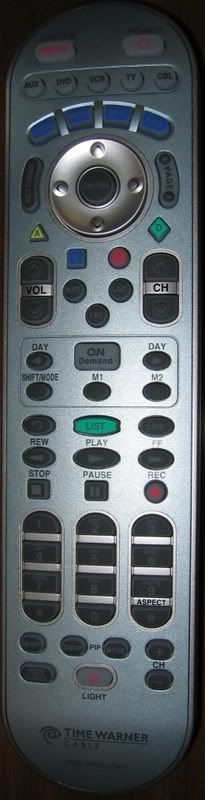
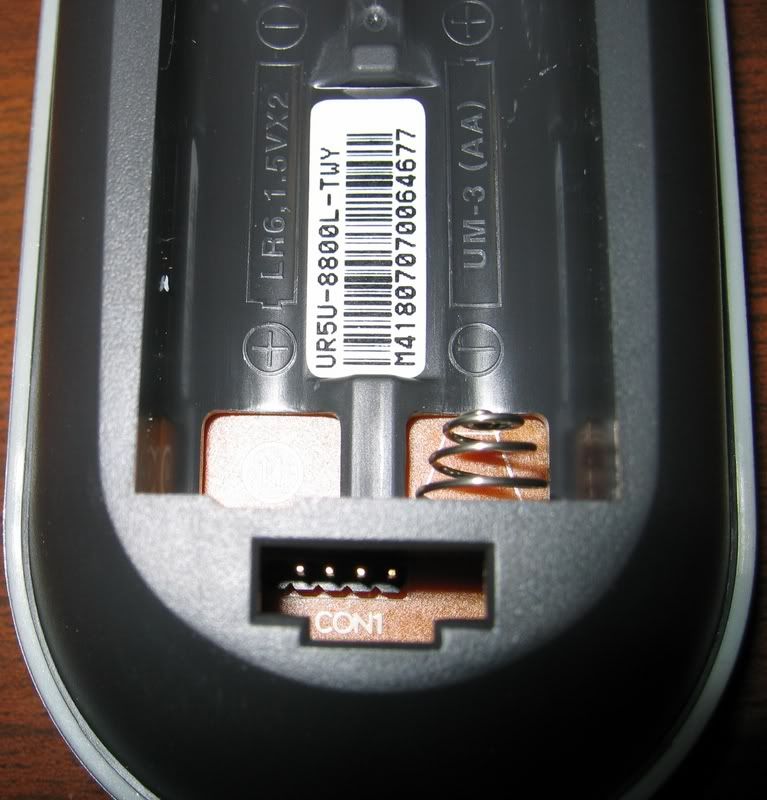
I got a new remote with a CON1 interface, UR5U-8800L I posted images in the file section MISC.
not sure how to link them here, has anyone ever come across this interface?
[/img]
Posted: Mon Sep 17, 2007 2:14 pm
by jimdunn
Here's the links for you:
UR5U-8800L front
UR5U-8800L
It's not a JP1 connector - or JP1.x - or it would have 6 pins.
Posted: Mon Sep 17, 2007 3:26 pm
by Capn Trips
...and for those who cannot be bothered to download the pics:
Posted: Mon Sep 17, 2007 7:58 pm
by kabrera
thats correct, it only has 1 row

Internal pics
Posted: Wed Sep 19, 2007 10:10 am
by kabrera
I opened the remote and posted 2 more pics..
https://www.hifi-remote.com/forums/dload ... le_id=5042
https://www.hifi-remote.com/forums/dload ... le_id=5043
samsung q709
3f80j9xzz-sn99
k08ga
and another chip reading 4.00 M
[/img][/url]
Posted: Wed Sep 19, 2007 12:06 pm
by MaskedMan
By those key shapes, I would say this is a Universal Remote Control Inc (URC) remote and not a UEI made remote. In other words not a jp-1 capable remote.
A terrible picture of the
URC R7 & UR7 Gamer, Similar keys.
Posted: Thu Sep 20, 2007 2:59 pm
by binky123
The samsung and 3f80 lettering seems to indicate it is using the S3F80 chip. You'll have to trace your CON1 pins to the MCU and see what pins they connect to.
Posted: Thu Sep 20, 2007 6:49 pm
by unclemiltie
I agree that these are not likely JP1 remotes
But with the S3F80 in them, they maybe hackable. But it'll take a huge effort to get to the level that we are here on this forum with tools and knowledge that has taken years to understand.
But, it would be interesting to see just what's in that remote if you can get into the I2C bus.
Posted: Fri Sep 21, 2007 12:06 pm
by Capn Trips
unclemiltie wrote:But, it would be interesting to see just what's in that remote if you can get into the I2C bus.
No unclemiltie, NO! Please do not get distracted from the Atlas 30333033 extender project.

Please do not go down that dark URC path! Stay on the UEIC path to enlightenment!

Posted: Sun Sep 23, 2007 8:42 am
by classicsat
The chip marked 4.000 is the oscillator.
The pads between the oscillator and the controller chip are promising, if Con1 doesn't pan out.
Posted: Thu Jan 10, 2008 10:10 am
by wiltonr
I've got a similar URC remote (UR4U-MDVR-CHD2) with the same IC (3F80J9XZZ-SN99). Next to the CON1 header is a triangle for orientation. If you number the pin closest to the triangle 1, and the farthest pin 4, then the connections between the CON1 and the MCU are as follows: CON1 pin1 goes to MCU pin 28, pin 2 to MCU pin 1, pin 3 to MCU pin 25, and pin 4 to MCU pin 6.
This remote is designed to be used with programming software called Upgrade Link2, available here:
http://www.universalremote.com/resource ... 2Setup.exe
More information about this software and the CLIKR5 remotes is available here:
http://www.universalremote.com/corporat ... hp?press=2
Even though URC lets you download the software, they won't provide any info on what type of cable or pinouts to use, claiming that it is for the local cable companies use only. It looks perfect, however, allowing for the customization of all keys, including macros.
Unfortunately I can't find any info on this Samsung IC, but hopefully someone will be able to, and we'll be able to play with a whole new class of programmable remotes! It looks like these remotes are the new standards that Time Warner and Charter are supplying for their motorola digital cable boxes, both with and without DVR.
Posted: Thu Jan 10, 2008 12:52 pm
by Evan_s
I downloaded the software and took a look at it. Couldn't actually use it but still was able to get an idea of what we are looking at. Overall I'd say that with the software these remotes are about equal to the jp1 remotes with the modem for wav downloads.
As far as I could tell the software couldn't decode a learned signal and couldn't create a new device from scratch. You could move around buttons from a built in code setup the device code and setup macros but not much else in the software. It could do a live update that I assume will update the device database to allow you to control new devices but only once the mfg has added them to the database. Obviously these are programmable from a computer so if someone wanted to take the time it would probably be possible to figure out how to program them like we do with jp1 remotes.
An interesting note from the help is that you have to remove the batteries while programing it so I'm going to assume that power is part of the CON1 connector.
Posted: Thu Mar 27, 2008 6:43 pm
by Daniel_Eble
Samsung S3F80J9
http://www.samsung.com/global/business/ ... um=S3F80J9
On my URC-R6, there is no CON1, but the pads between the controller and the oscillator are labeled "Test Gnd Reset Tx Rx Vcc."

Even without CON1 or those pads, the data sheet says it is possible to reprogram the internal flash memory from the outside, so one
could start from scratch, if one wanted.
Silly Question
Posted: Sat Jun 28, 2008 12:22 pm
by anthonynyc
Hello Group,
I too have this new Con1 remote from Time Warner for my DVR.
I was hoping to find a cable to use with the software to try and get my tv and dvd and audio to correct locations.
I wonder, and I know this is probably a stupid question, but since the 4 pin output uses it's own power, could it be a simple USB type connection?
Pin for pin?
I doubt they would make such an easy connection, LOL
Actually after reading other more intelligent posts, i believe maybe it 2 pins are for power and the other 2 an audio input, to transfer the wav file that updates it, since the software appears similar to modem types as stated in other post.
But was just thinking outloud, thanks.
Anthony
Re: Silly Question
Posted: Fri Dec 21, 2012 4:23 pm
by pat_macrotch
anthonynyc wrote:Hello Group,
I too have this new Con1 remote from Time Warner for my DVR.
I was hoping to find a cable to use with the software to try and get my tv and dvd and audio to correct locations.
I wonder, and I know this is probably a stupid question, but since the 4 pin output uses it's own power, could it be a simple USB type connection?
Pin for pin?
I doubt they would make such an easy connection, LOL
Actually after reading other more intelligent posts, i believe maybe it 2 pins are for power and the other 2 an audio input, to transfer the wav file that updates it, since the software appears similar to modem types as stated in other post.
But was just thinking outloud, thanks.
Anthony
I like where your going with this, what do you suppose the plug, or pinout would look like? mine says vcc, gnd, ispsel, nx
